Partner Area — Dashboard, Payouts, Marketing and Settings
The partner area has four pages. Open them in the sidebar under Area partner: Dashboard partner, Pagamenti, Marketing and Impostazioni partner. Below them you also find Condizioni partner (see Partner terms).
The area only appears once your partner application is approved (see Become a partner).
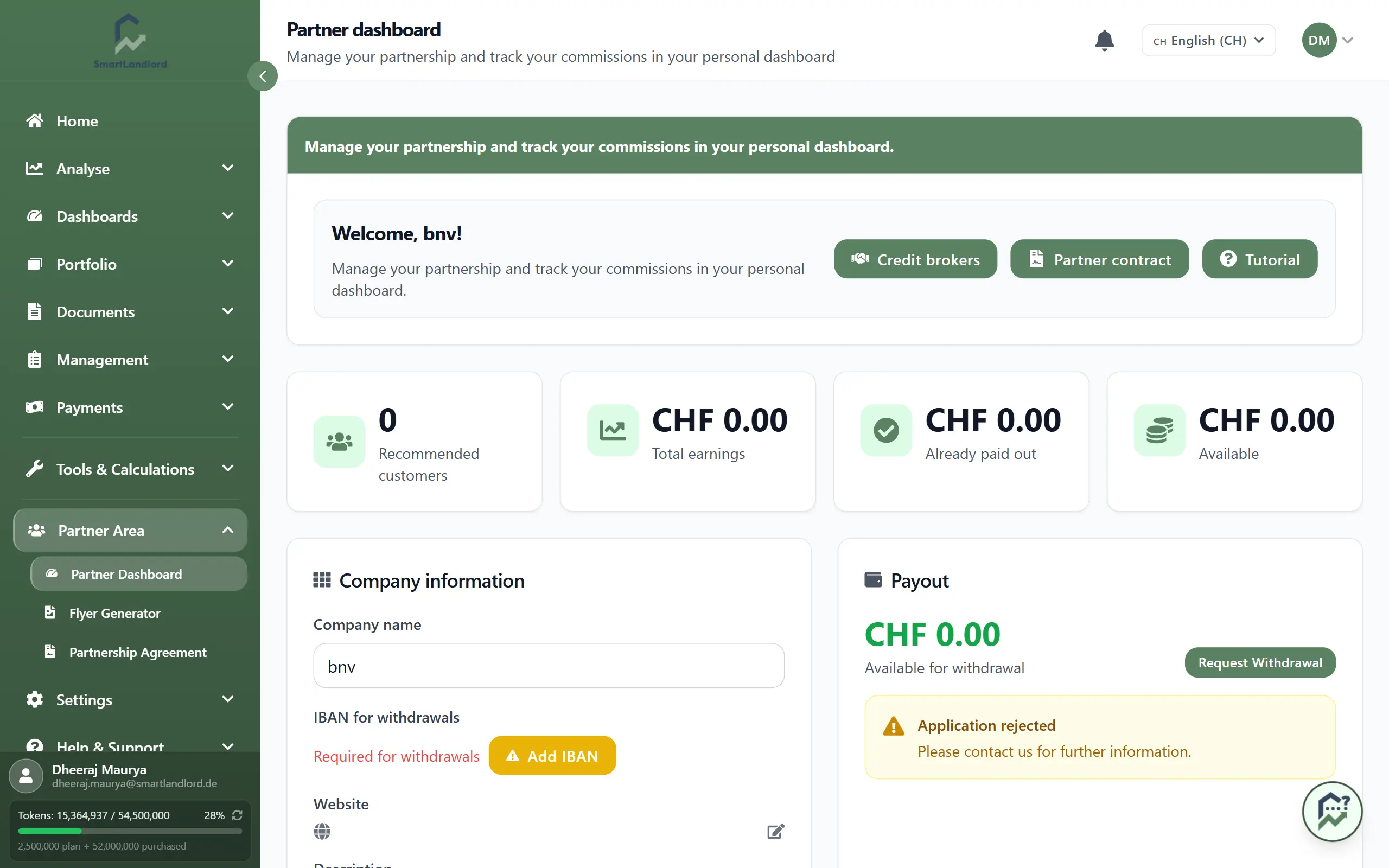
Dashboard
The dashboard is the overview. From top to bottom:
- Welcome line with your current partner tier and your referral code, plus the button Condizioni partner.
- Notice banners, if needed: if the partner terms are not accepted yet, you can read and accept them here. For a rejected application, the reason is shown here.
- Four key figures: Clienti consigliati (with the number of all sign-ups via your code, with or without a subscription), Guadagni totali (broken down into commission, the referral bonus for sign-ups and, once there is one, the revenue share), Già pagati and Disponibile.
- Prossimi passi: the list shows what is still missing (add your IBAN, add website and description, upload your logo, accept the partner terms). Each open item takes you with Fallo ora to the right tab in the settings. Once everything is done, the list disappears.
- Lead caldi: enquiries from users who match your service category and service area and agreed to be passed on appear here. Apri la casella opens the inbox.
- Livello partner: your tier (Bronze, Silver or Gold) and the progress to the next one. The tier follows from the number of referred customers with an active paid subscription. Maggiori informazioni sui livelli dei partner opens the explanation. The current thresholds and terms are in the "Partner tiers" section of the partner programme page.
- Referral code with a copy button and a link to the Marketing page.
Payouts
The page Pagamenti ("Earnings & payouts") shows your money.
Your earnings have three parts:
- A fixed credit for every person who registers through your link or code and confirms the email address, whether or not that person ever buys.
- A one-time commission for the customer's first paid subscription. For a yearly subscription it is credited with the first payment. For a monthly subscription it is credited in one amount once the customer has paid for three months. Until then you receive parts 1 and 3. The basis is the list price of the package, and a customer discount does not reduce it. It is paid once per customer.
- A recurring revenue share for every further paid billing period of the customer, from the second payment on, for as long as the customer pays and the partnership exists. The basis is the listed price of the booked package; extra properties and other add-ons do not count, and discounts do not reduce it.
Refunded or charged-back payments do not count. The amounts depend on your tier and are shown on the partner programme page.
The page from top to bottom:
- Payout: your available balance and the button Richiesta di ritiro. A window opens where you enter the amount and submit the request. From the minimum balance (see partner programme) payouts are made monthly by bank transfer to your IBAN. A balance below the minimum is carried forward and never expires.
- Statistiche sul reddito: a chart of new customers and earnings for the last 7 days, 30 days, 90 days or a year.
- Visibility packages (optional): a package raises your weight in the AI recommendations, not your commission tier. The price is paid from your balance first, any remainder by card. The block only appears while a package is on offer.
- Ultimi pagamenti with date, amount and status.
- Referred customers: a table with user, join date and package.
Without a stored IBAN no payout is possible. Enter it under Impostazioni partner in the tab Dati di pagamento.
Marketing
The page Marketing holds everything you share.
On the left: your coupon code and your URL (referral link), each with a copy button, and the QR code to download. You cannot edit the code here, it is for display and copying only. Customers who use your code get a discount on their first payment, and the page shows the percentage.
A customer is attributed to you if they register through your link or QR code (this works for 180 days in the same browser and needs the customer's cookie consent), or if they enter your code at registration or when buying their first paid subscription. A registration with neither cannot be attributed later.
On the right: the marketing materials. Depending on the market these are the customer presentation (with your logo, link and QR code; view it, save it as a PDF or copy the link), the email signature and the personalized flyer with Creare un volantino (see Flyer generator).
Settings
The page Impostazioni partner has five tabs. The chosen tab is part of the page address, and the dashboard checklist jumps straight to it.
- Profilo: company name, website, LinkedIn (optional), description and logo. You change website, LinkedIn and description with the edit icon, the logo with the Modifica button. The company name is locked after verification. Request a change with Richiedi modifica. Vedi il profilo come visitatore opens your public profile in a new tab.
- Area di servizio: places and radius where you work. Empty means nationwide. Enquiries are matched by service category and service area.
- Visibilità pubblica: a switch for the entry in the public partner list with a link to your website. The switch only works once website and description are filled in.
- Dati di pagamento: your IBAN. Where Stripe payouts are offered, the block "Payout via Stripe" is shown here as well.
- Condizioni partner: a notice banner if the agreement is not accepted yet, and the button Condizioni partner, which opens the agreement page.