My Inventory — Your Properties at a Glance
Il mio inventario lists every property in your portfolio with its key figures. From here you add new properties, search and filter, open a property's profile or analysis, and delete entries.
Open it in the sidebar under Portafoglio → Il mio inventario.
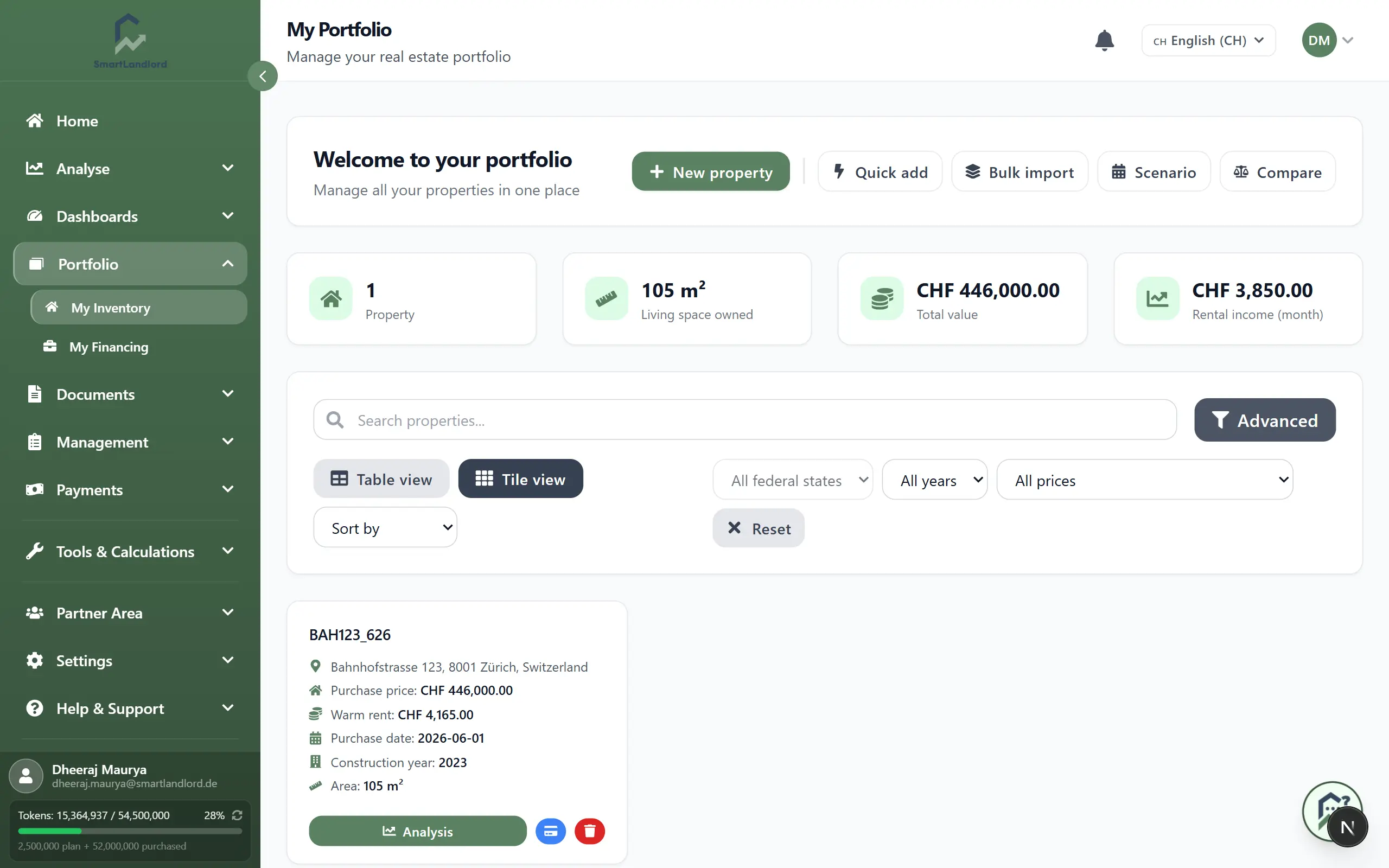
What you see
Four cards at the top:
- Proprietà – number of your properties.
- Spazio abitativo di proprietà – sum of living areas.
- Valore totale – sum of the purchase prices (not market values).
- Reddito da locazione/mese – sum of cold rents.
Below are search, filters and the properties. The default is tiles; Vista tabella switches to the list/table display, Vista a riquadri switches back. There, each property first appears as a list card; the Acceso/Spento switch next to the columns icon turns it into a real table.
Each tile shows address, Prezzo di acquisto, warm rent, purchase date, construction year and area. When data exists it also shows:
- Debito residuo – today's remaining balance of all loans on the property. The line is missing if no loans are recorded.
- Valore di mercato (osservato) – a guide value: observed prices per m² at the location times your living area, rounded to thousands. Hover to see the price per m² and the month of the observation. If there is no observation for that location and property type, no market value is shown.
Multi-family buildings carry an MFH badge.
Incompleto means address or area is missing. Without both, the property cannot be classified and valued properly. A missing purchase price or rent is deliberately not flagged (for example inherited or owner-occupied properties).
Add a property
The buttons at the top of the page:
- Nuova proprietà – opens the full ImmoCheck analysis. The result is the property's ImmoCheck report.
- Aggiunta rapida – opens a short form in four sections (property data, equipment, rental income, operating costs). Above it you can upload a listing as a PDF; its details fill the form and you correct and save.
- Importazione in blocco – creates many properties at once from a CSV or Excel table.
- Scenario – opens scenario planning.
- Confronta – opens the property comparison.
If your package has no free property slot left, a notice about upgrading appears instead of the form. Packages and prices: pricing.
Search, filter, sort
- The search field (Cerca per nome, indirizzo, regione o altre proprietà...) filters by name, address and property ID.
- Three quick filters: Tutte le regioni, Tutti gli anni (construction year) and Tutti i prezzi (purchase price ranges). Ripristina clears the quick filters and the search.
- Avanzato shows more filters: purchase price from/to, area from/to, construction year from/to. They apply immediately.
- Ordina per: Nome, Prezzo, Data di acquisto or Superficie; the arrow next to it reverses the order.
In table view, the columns icon lets you choose which columns are visible, including equity and parking spaces.
Work with a property
Clicking the tile or row opens the property profile. The buttons on the tile (icons in the row in the real table; in the list card only profile and delete) go straight to:
- Analisi – the property's ImmoCheck report.
- Pagamenti – bank transactions filtered to this property.
- Unità – multi-family buildings only; opens the profile.
- Genera Esposé and Genera Esposé d'Affitto – each creates a PDF (tile only).
- Elimina – after confirmation. Deleting cannot be undone. The public demo property cannot be deleted and has no such button.
The profile has the tabs Dati sulla proprietà, Dati finanziari, Entrate e uscite, Inquilini, Costi operativi, Rapporti, Documenti and Immagini. Under Dati finanziari you find the current figures, including market value (if available), Variazione di valore dall'acquisto and Debito residuo (oggi).