User settings
Under Impostazioni → Impostazioni utente you maintain your profile, secure your account, control e-mails and cookies and see your subscription. The page has six tabs at the top:
- Dati personali
- Sicurezza
- Notifiche
- Profilo dell'investitore
- Informativa sulla privacy
- Abbonamento (has its own guide: Subscription)
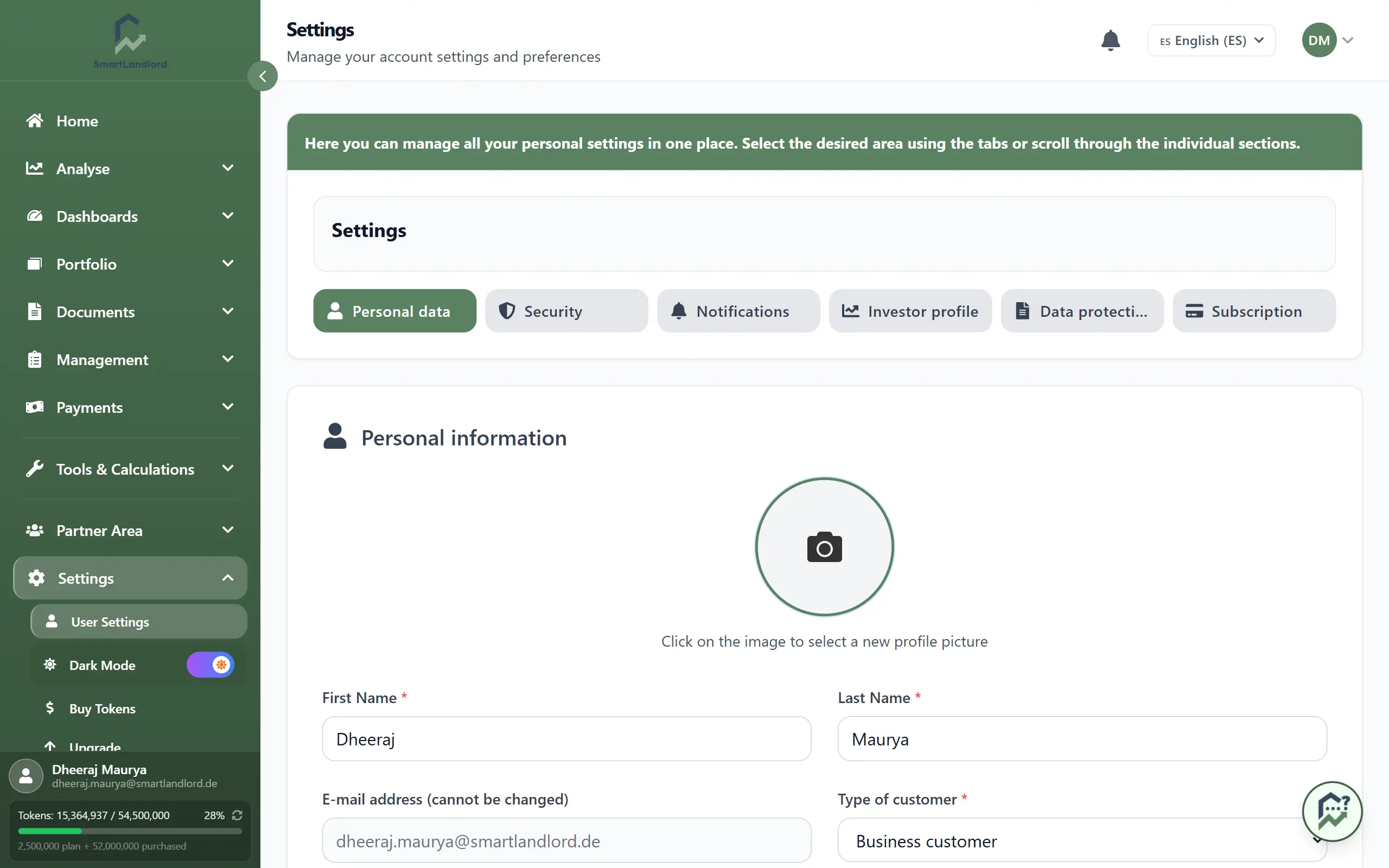
Dati personali
In the block "Informazioni personali" you enter:
- Optionally a profile photo: click the picture area (Fare clic sull'immagine per selezionare una nuova foto del profilo.) and choose an image file. Elimina removes it again.
- Nome and Cognome (required).
- The e-mail address is only displayed, it cannot be changed here.
- Tipo di cliente: Privato or Aziendale (required). For a business customer an extra field for the VAT ID appears, also required.
- Numero di telefono. With Verifica telefono you receive a verification code; enter it and confirm with Conferma.
- Data di nascita (required).
- Lingua preferita: language for system e-mails such as confirmations and notifications.
- Street, postal code and city. This address is used as the landlord address on lease contracts and is optional.
Save the tab with Salva le impostazioni at the bottom right.
Sicurezza
The tab has three blocks.
Autenticazione a due fattori (2FA): shows the status (Stato 2FA) and the button Gestire la 2FA, which opens the separate 2FA page (see below).
Password: Under Modifica della password enter your current password, the new password and its repetition; the requirements are listed under the new-password field. Instead of the current password you can use the link Usa invece un codice via e-mail to use a code sent by e-mail. You save with Salva le impostazioni directly below this block; with the code variant a window for entering the code opens afterwards. If your account was created with an e-mail code or Google, it has no password yet: the block is called Imposta password and confirmation always goes through the e-mail code.
Sessioni attive: list of all devices you are signed in on, with device, place and sign-in time; your current device is marked. Termina signs another device out immediately, Termina tutte le altre sessioni signs out all but the current one.
Setting up two-factor authentication
The 2FA page shows the active methods; you can use both at the same time:
- OTP via email: Attiva OTP via email, then you receive a code by e-mail when you sign in.
- App di autenticazione: Generare un codice QR, scan the QR code in Google Authenticator or Microsoft Authenticator (or type in the secret by hand), enter the code and finish with Confermare e abilitare il 2FA.
- If both are active, Imposta Authenticator come principale or Imposta OTP via email come principale decides which one is asked first at sign-in.
- Under Codici di backup you see your emergency codes; Rigenera codici creates new ones.
- Disattiva 2FA turns everything off; you enter your current password for this.
Keep the backup codes apart from your phone. Each code works only once. If you have neither access to your second method nor backup codes, you must contact support.
Notifiche
Three switches, saved with Salva le impostazioni:
- E-mail generali:: general updates and important messages about your account.
- E-mail di marketing:: offers and promotions (optional).
- Iscrivetevi alla nostra newsletter.: our newsletter.
Profilo dell'investitore
This is where your investor type is shown, derived by the AI from a short questionnaire.
- No profile yet? Start with Avvio del questionario and answer the questions (a few minutes).
- Afterwards Tipo di investitore attuale shows investor type and characteristics, and the block Obiettivi di investimento shows your personal goals.
- Ripetere il questionario lets you fill in the questionnaire again when your goals change.
- In the block Azzeramento del profilo, the button Ripristina (after a confirmation) only clears the questionnaire results and the fields derived from them. Phone, 2FA and other account settings stay.
Informativa sulla privacy
- Protezione dei dati e GDPR: Esportare i miei dati opens the export page. You receive your data as a ZIP file; the download link is valid for 30 days.
- Impostazioni dei cookie: necessary cookies are always on, Cookie analitici and Cookie di marketing can be switched individually and saved with Salva le impostazioni. The link to the privacy policy gives the details.
Abbonamento
Plan, usage, payment methods and cancellation are covered in the guide "Subscription".