My Financing — Record Loans and Keep Track of Them
Il mio finanziamento lists all loans in your portfolio, with totals at the top. Here you add, edit and delete loans. Each loan belongs to exactly one property.
Open it in the sidebar under Portafoglio → Il mio finanziamento.
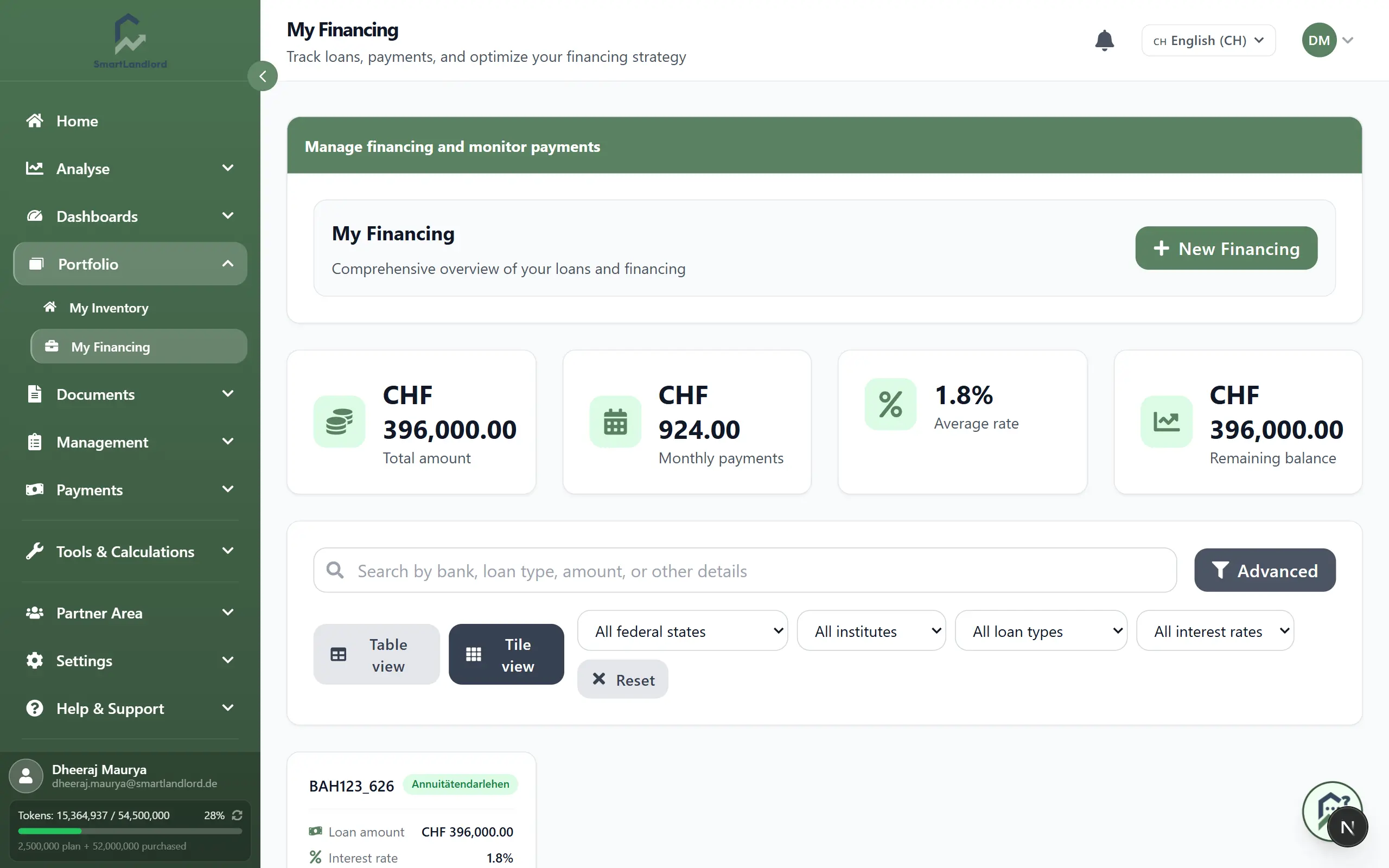
What you see
Four cards at the top:
- Importo totale – sum of the original loan amounts.
- Pagamenti mensili – sum of the monthly instalments. Each loan's instalment is calculated from amount, interest rate, repayment rate and term, using your country's calculation rule.
- Tasso medio – plain average of the interest rates of all loans (not weighted by loan size).
- Saldo residuo – today's remaining balance of all loans. It is calculated from loan start, interest and repayment, not taken from the amount you entered when creating the loan.
Below, the loans appear as tiles (Vista a riquadri) or as a table (Vista tabella); there each loan first appears as a list card, and the ON/OFF switch next to the columns icon turns it into a real table. A tile shows property, credit institution, loan type, loan amount, interest rate, repayment rate, loan start and fixed interest period. The remaining balance per loan is not on the tile, only the total at the top.
Add a loan
- Click Nuovo finanziamento.
- Choose the property under Finanziamento per:. The list contains your properties; create them first under Il mio inventario.
- Fill in the required fields: Istituto di credito, Importo del mutuo, Tasso di interesse, Tasso di rimborso:, Tasso di interesse fisso (in years), Tipo di mutuo and Data di inizio del prestito:.
- Click Salva.
Notes on individual fields:
- Under Proposte di tassi di interesse, the BCE 2,15% button enters the current ECB base rate as the interest rate. That is only a suggestion; enter the rate from your contract.
- The Tipo di mutuo options depend on the country. For some types a Dettagli del prestito block appears with extra fields: for amortizing loans Tasso di rinnovo and Rimborso anticipato annuo, for variable-rate loans Margine, Intervallo di revisione (mesi) and Indice di riferimento.
Search and filter
- Search finds loans by property name and credit institution.
- The quick filters Tutte le regioni (by the property's location), Tutti gli istituti, Tutti i tipi di prestito and Tutti i tassi di interesse narrow the list; Ripristina clears them. The institute filter offers a fixed choice of large German banks.
- In the table, the columns icon lets you choose which columns are visible.
View, edit, delete
- View: clicking a tile or row opens Dettagli sul finanziamento with the loan's key data (read-only). This page does not show a repayment schedule.
- Edit: the pencil icon opens Modifica del finanziamento. Change the fields, for example the interest rate after a refinancing, and click Salva le modifiche. Totals and remaining balance are recalculated.
- Delete: the trash icon asks for confirmation and removes the loan permanently from all totals.
Delete a loan only if it never existed. If the terms changed, edit it instead.
Loans in the property profile
The same loans appear in the property's profile under Dati finanziari in the section Dati di finanziamento: one card per loan with Tipo di prestito, Importo del prestito, Tasso di interesse, Tasso di rimborso, Durata del prestito (anni) and Inizio del mutuo. There you save with Salva le modifiche and delete with Elimina.
Above the loans, the profile compares your Finanziamento necessario with equity and loans:
- Deficit di finanziamento – the loans fall short. Aggiungi un prestito per l'importo residuo prepares a new loan with the missing amount.
- Completamente finanziato or Interamente finanziato, spese di acquisto incluse – the need is covered; in the second case the purchase costs are financed as well.
- Sovrafinanziato – the loans exceed the need.
The need is purchase price (plus parking spaces), financing costs and other costs minus equity; small deviations are tolerated. The display is advisory and blocks nothing. If the financing-costs amount looks unusually high, the profile points out that the loan amount was probably entered in the wrong field.