EnergyCheck: analyse a property's energy consumption
The EnergyCheck (Analisi → EnergyCheck) estimates a property's energy efficiency class, its yearly heating costs and its CO₂ emissions from living area, year of manufacture, heating type and consumption. It also shows ways to improve and runs renovations through a simulator. You do not need a property in your inventory: the form stands on its own.
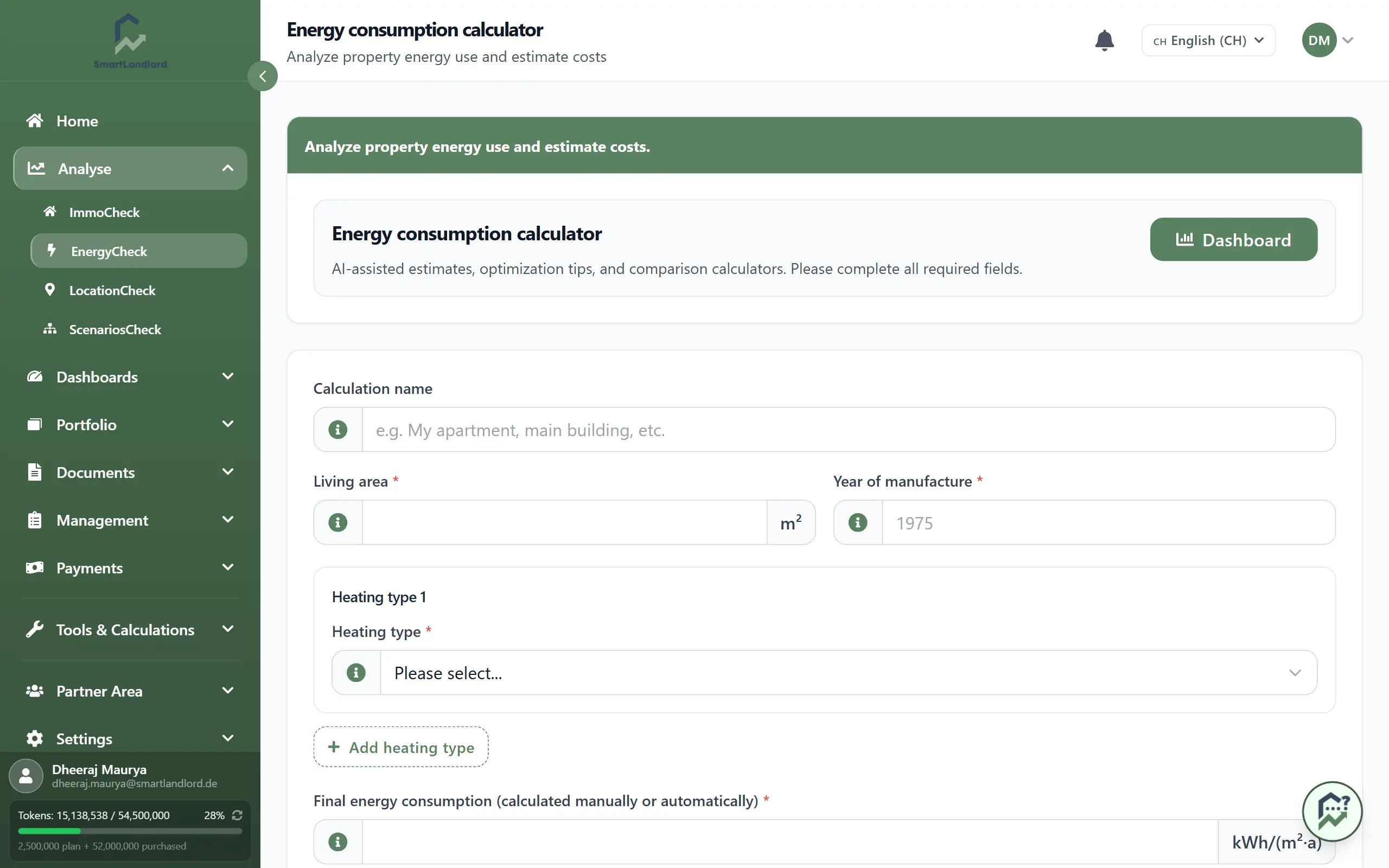
1. Enter the details
- Optional: enter a Nome del calcolo, for example "My apartment". You will find the calculation under this name in the dashboard later.
- Enter Superficie abitabile (heated area in m²) and Anno di produzione. The year must be between 1500 and the current year.
- Under Tipo di riscaldamento 1, choose the heating type. Only then does the field Consumo effettivo dell'anno scorso (facoltativo) appear; its unit (for example m³, litres or kWh) depends on the heating type. If you choose heat pump, a Coefficiente di prestazione (COP) field is added (default 3.0).
- If the property uses several energy sources, click Aggiungere il tipo di riscaldamento and enter the next one. Rimuovere deletes an entry again.
- The field Consumo finale di energia (calcolato manualmente o automaticamente) in kWh/(m²·a) fills in by itself once living area and consumption are entered. If you know the value, for example from the energy certificate, type it in yourself. Without a value above 0 the analysis cannot run.
- Click Analizza ora. The button only becomes active when living area, year, at least one heating type and the final energy consumption are present.
If you change the heating type of an entry, its consumption is cleared because the unit is different.
2. Read the result
After the analysis the "Analisi del Consumo Energetico" page opens.
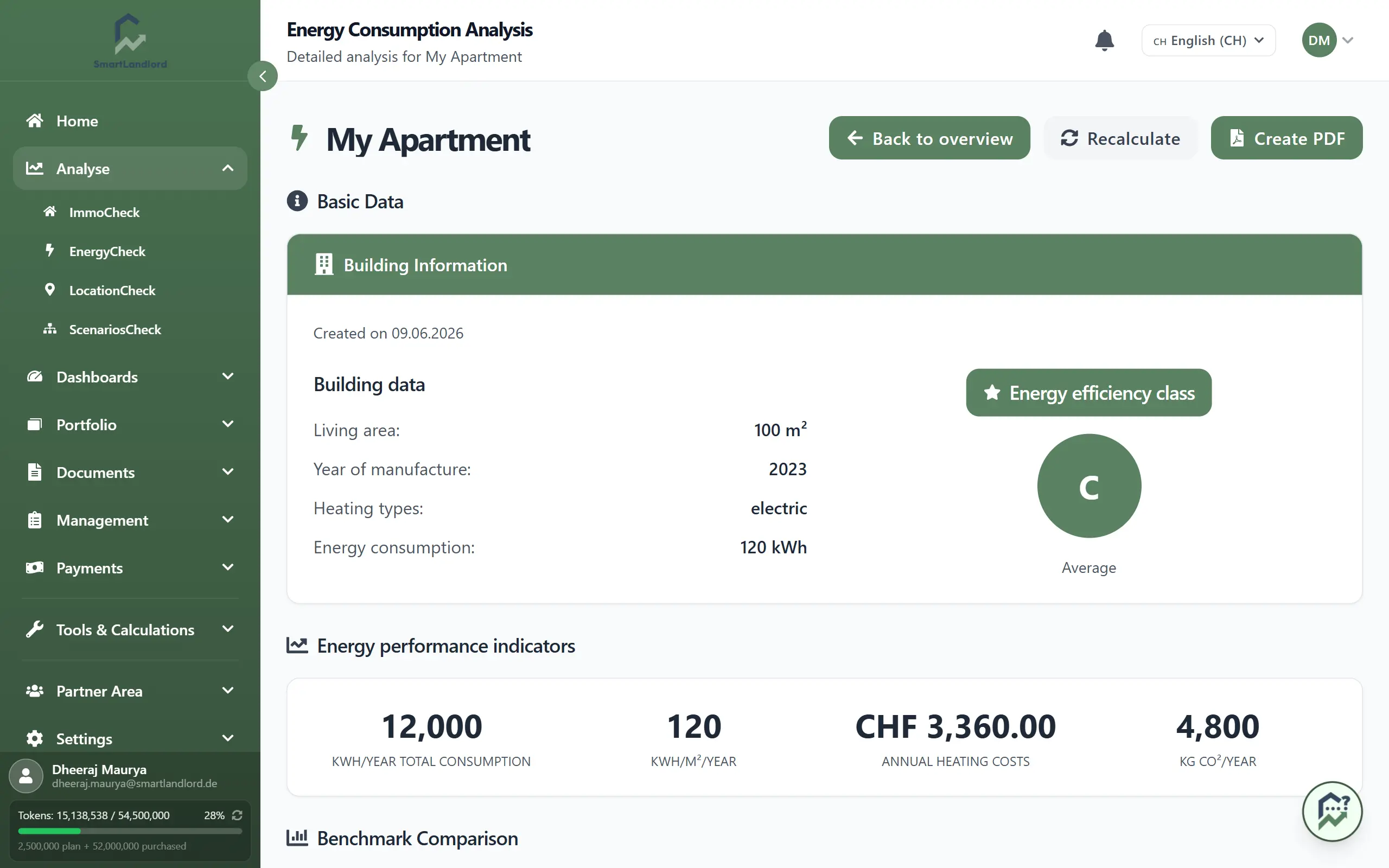
- Dati di Base: your inputs and the calculated Classe di efficienza energetica.
- Indicatori di prestazione energetica: total consumption per year, consumption per m² and year, yearly heating costs and CO₂ in kg per year.
- Confronto di Riferimento: your costs next to a modern new building and a typical old building.
- Classificazione dell'Efficienza Energetica: a chart placing your building among the classes.
- Analisi Energetica con IA: a written assessment, if one has been generated.
- Ripartizione del sistema di riscaldamento: the estimated yearly costs and CO₂ of your heating system.
If the building is in a class worse than A, the block Misure di ottimizzazione consigliate follows:
- Misure Immediate with priority, estimated savings and investment range (only for classes D to H).
- Confronto Sistemi di Riscaldamento: choose a Sistema Attuale and an Alternativa and click Confronta. It shows which system is cheaper and which is more eco-friendly.
- Simulatore di Ristrutturazione: set Isolamento Tetto, Isolamento Pareti, Rinnovo Finestre and Aggiornamento Riscaldamento. Below, you see Risparmio Totale, Nuova Classe di Efficienza Energetica, Risparmio sui Costi per Anno and Riduzione CO₂.
Three buttons sit at the top of the page: Indietro to the form, Ricalcola and Crea PDF.
Nota: l'intelligenza artificiale può commettere errori; i risultati devono essere considerati come una guida. The result is an estimate and replaces neither an energy certificate nor an expert report.
3. Earlier calculations: the energy dashboard
Under Dashboard → Dashboard energia (or the Cruscotto button in the form) you see all calculations. The dashboard shows key figures for the properties in your inventory, a table with class, heating costs, consumption and CO₂ per entry, and charts. The eye icon opens an entry; standalone calculations (without a property) can also be deleted there. Nuova analisi takes you back to the form, Esportazione in PDF creates a PDF of the overview.