Benvenuto
Home Dashboard — Your portfolio at a glance
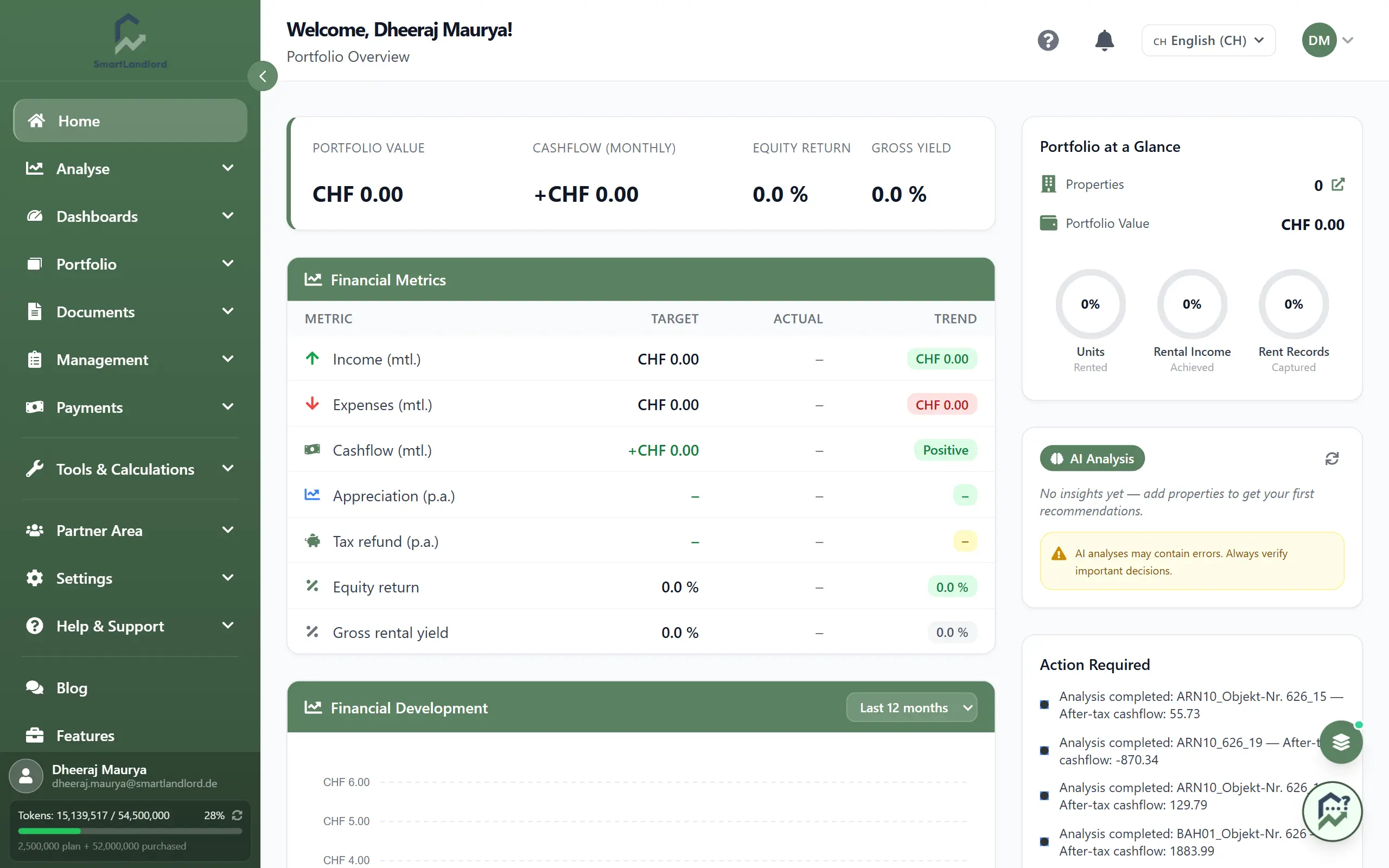
Home is the first entry in the sidebar and the screen you land on after signing in. It shows key figures, trends, a map and open items for your portfolio. For deeper analysis, see Dashboard.
First visit
A short introductory tour starts on the first visit. Use the question mark in the header (Fai il tour) to run it again.
Left column
- Key figures strip at the top: Valore del portafoglio, Flusso di cassa (mensile), Rendimento del capitale proprio and Rendimento lordo.
- Metriche finanziarie: a table with the columns Indicatore, Previsto, Effettivo and Trend. Rows: Entrate (mens.), Uscite (mens.), Flusso di cassa (mens.), Rivalutazione (annuale), Rimborso fiscale (annuale), Rendimento del capitale and Rendimento lordo da locazione. Where there is no value yet, it shows "–".
- Sviluppo finanziario: a chart of projected and actual income and expenses. Pick the period in the chart header, top right: Ultimi 3 mesi, Ultimi 6 mesi, Ultimi 12 mesi, Ultimi 24 mesi or one of the last three calendar years.
- Le tue proprietà: a map with one marker per property. Hover over a marker for a short summary with a link to the property profile.
Right column
- Portafoglio a colpo d'occhio: number of properties (the icon next to it opens Il mio inventario), portfolio value and three rings: Unità Affittato, Redditi da locazione Raggiunto and Ricevute di affitto Registrato.
- Analisi AI: short notes about your portfolio. The Aggiorna icon reloads them. While there is nothing to report, a placeholder text is shown.
- Azione richiesta: open tasks such as overdue rent or expiring contracts. Clicking an entry takes you to the relevant page. If nothing is open, the card shows your recent activity instead, such as newly added properties and analyses.
- Tipo di investitore: your investor type. The pencil icon opens the Modifica profilo investitore dialog with five steps; save at the end with Crea profilo.
Good to know
- Where data is missing, tiles stay empty ("–") or show zero.
- At the bottom right there is a small switch with the views Standard, Executive and Analytics. It toggles between three variants of the home page.
The AI analysis can contain errors. Check its notes before you make financial decisions.